
Your Keys, Your Coins: The Complete Guide to Safely Storing Bitcoin

The first step is buying Bitcoin. The next, and arguably more important, step is making sure no one can take it from you.
If you missed our primer on how and where to buy Bitcoin, start there first. This post picks up where that one left off.
Why Storage Is the Most Important Decision You'll Make
Most people who lose Bitcoin don't lose it to hackers cracking cryptography. They lose it because they trusted someone else to hold it.
Exchange collapses. Platform freezes. Company fraud. Government seizure. These aren't hypotheticals — they're a recurring pattern in Bitcoin's history. Mt. Gox. Celsius. FTX. BlockFi. Voyager. In every single case, people who held their Bitcoin on these platforms lost access to it, sometimes permanently.
The core promise of Bitcoin is that it's a bearer asset, whoever controls the private keys controls the coins. But when your Bitcoin sits on an exchange, you don't control the keys. The exchange does. You have a claim, an IOU, a number on a screen. You don't have Bitcoin.
Cold storage changes that. It puts you back in control of ownership.
What Is Cold Storage?
Cold storage means keeping your Bitcoin private keys on a device that is never connected to the internet.
When Bitcoin was created, Satoshi Nakamoto designed a system where ownership is proven by a cryptographic private key, a long string of numbers and letters that authorizes transactions. Anyone who has your private key can spend your Bitcoin. Anyone who doesn't, can't.
A hardware wallet (cold storage device) generates and stores that private key entirely offline. It signs transactions locally, without your key ever touching an internet-connected device. Even if your computer is compromised by malware, your Bitcoin is safe, because the private key never left the hardware wallet.
This is what "not your keys, not your coins" actually means in practice. Hodl & Hash recommends getting a hardware wallet if you have more that $2000 in Bitcoin.
At today's price, $2,000 buys you:
—
Understanding Seed Phrases
Before we get to devices, you need to understand seed phrases because they are the master key to everything.
When you set up a hardware wallet, it generates a seed phrase: typically 12 or 24 random words in a specific order. This seed phrase is the root from which all of your Bitcoin private keys are derived. It is everything.
If your hardware wallet is lost, stolen, or destroyed, you can recover every single one of your Bitcoin wallets using only the seed phrase on any compatible device. Conversely, if someone else gets your seed phrase, they can steal your Bitcoin instantly, from anywhere in the world, with no recourse. So you can understand why it is important to secure your private seed phrase and protect it with a passphrase during your initial cold storage set up.
Seed phrase rules:
- Consider stamping it into steel for fire and flood resistance.
- Never type it into a computer, phone, or website.
- Never photograph it.
- Never store it digitally in any form.
Your hardware wallet can be replaced. Your seed phrase cannot.
Self-Sovereignty: Why This Goes Beyond Finance
Cold storage isn't just about security. It's about sovereignty.
Bitcoin was designed as a response to a financial system built on trust in banks, governments, payment processors, and institutions to act honestly and to remain solvent. History shows that trust is frequently misplaced.
When you hold your own Bitcoin keys, you opt out of that dependency entirely. Your Bitcoin cannot be:
- Frozen by a bank or government
- Seized without physical access to your device and passphrase
- Inflated away
- Denied to you by a platform's terms of service
- Lost in a company bankruptcy
This is what financial sovereignty actually looks like. Not a number on an app that a corporation controls. An asset that you hold, that follows mathematical rules, that no third party can touch.
The technical steps of cold storage are simple. The mindset shift is the harder part. You are your own bank. That comes with responsibility, but it also comes with a freedom that the traditional financial system simply cannot offer.
Hardware Wallet Reviews
There is no single "best" hardware wallet. The right choice depends on your technical comfort level, your threat model, and how much you value supply chain transparency. Here are the three most respected options in the Bitcoin space.
Trezor
Best for: Beginners who want a trusted, user-friendly device.
Trezor, made by SatoshiLabs in the Czech Republic, was the world's first commercially available hardware wallet. The Trezor Model T and the newer Trezor Safe 3 are both solid entry points into self-custody.
Strengths:
- Extremely beginner-friendly interface and setup process
- Strong community support and years of battle-tested reliability
- Trezor Suite desktop app is well-designed and easy to navigate
- Compatible with a wide range of third-party wallets including Sparrow
Weaknesses:
- Does not have a secure element chip on older models (the Safe 3 added one)
- Connected via USB — some security-conscious users prefer air-gapped setups
- Historically had some vulnerabilities requiring physical access to exploit (firmware updates have addressed many of these)
Price range: $79–$219 USD depending on model
Bottom line: Trezor is the easiest on-ramp to self-custody. If you're just getting started and want something that works without a steep learning curve, this is where most people should start.

SeedSigner
Best for: Technical users who want maximum supply chain independence.
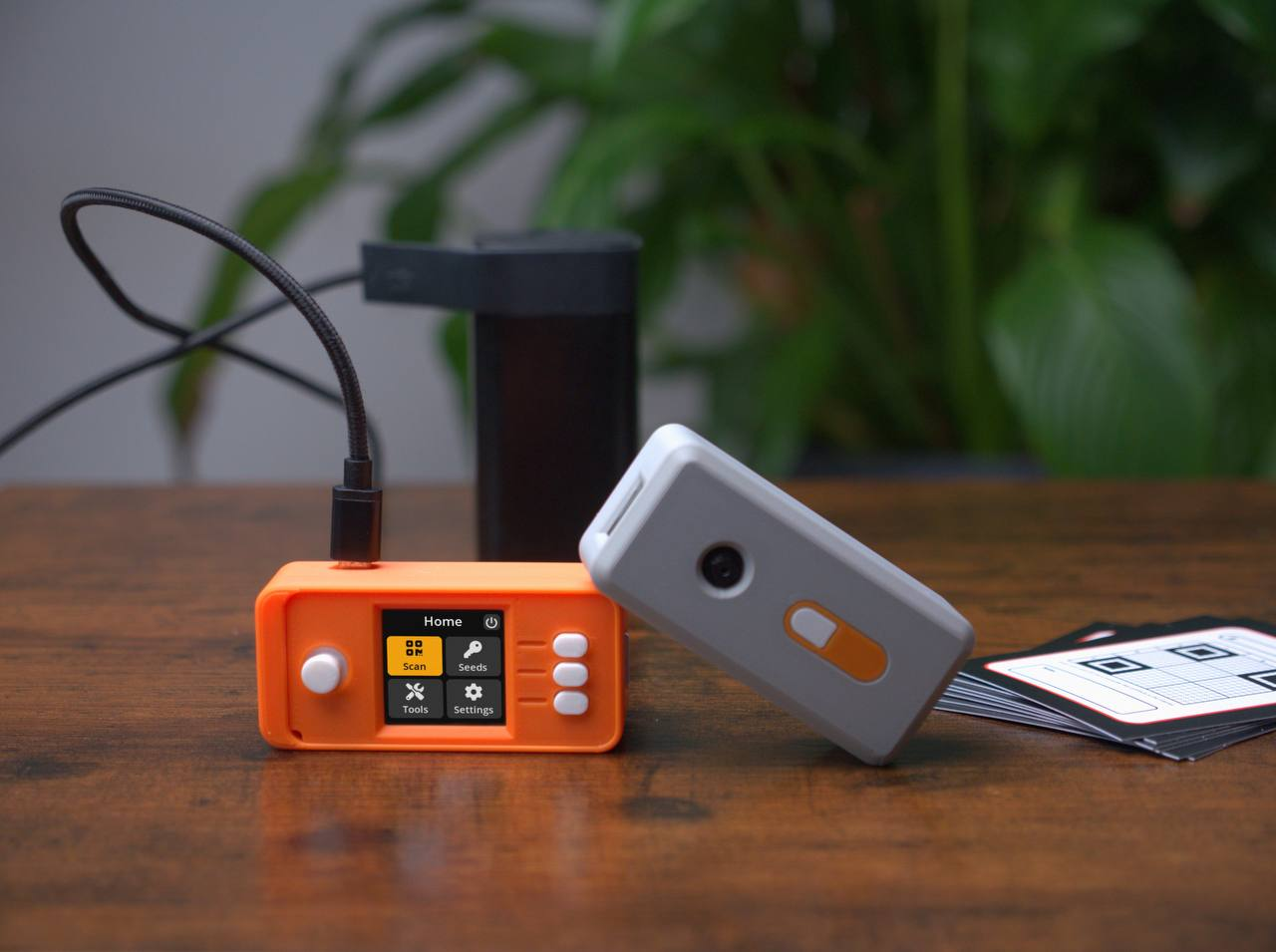
SeedSigner is not a commercial product — it's an open-source project that turns a Raspberry Pi Zero into a fully air-gapped hardware wallet. You buy the components yourself, assemble them, and flash the firmware. The total cost is typically under $50.
Strengths:
- Complete supply chain transparency — you source the parts yourself
- Stateless design: no seed phrase is ever stored on the device (you scan your seed each time you use it)
- Fully air-gapped — communicates via QR codes only, never touches a cable
- Extremely low cost
- Bitcoin-only
- Strong community development and verification
Weaknesses:
- Requires assembly and technical comfort
- Stateless design means more manual steps each session
- Not appropriate for complete beginners
Price range: $30–$60 USD in parts
Bottom line: SeedSigner is for the Bitcoiner who wants to verify everything from the ground up. It embodies the ethos of Bitcoin better than perhaps any other wallet option. If you're technically inclined and care deeply about trust minimization, it's a fascinating and legitimate choice.

Multisig: The Next Level
Once you've mastered single-key cold storage, the next step for larger holdings is multisig — requiring multiple private keys to authorize a transaction.
A common setup is 2-of-3: you have three hardware wallets, and any two are required to sign a transaction. This means:
- A single device being stolen or lost doesn't compromise your Bitcoin
- A single seed phrase being discovered doesn't compromise your Bitcoin
- You can store keys in different physical locations for geographic redundancy
Multisig is the standard for anyone holding significant amounts. Tools like Sparrow Wallet make setting up a multisig wallet with Coldcard, Trezor, or SeedSigner very approachable. Hodl & Hash recommends this set up if you hold more than $10k in Bitcoin.
At today's price, $10,000 buys you:
—
Practical First Steps
You've bought Bitcoin. Here's how to actually move it into cold storage:
Step 1: Choose your hardware wallet. Based on the reviews above, pick the device that fits your experience level. Order directly from the manufacturer — never buy used or from a third-party marketplace.
Step 2: Verify the device on arrival. Check that the packaging is sealed and tamper-evident. On Coldcard, verify the genuine check on first boot. Never use a device that shows any signs of tampering.
Step 3: Initialize the device and generate your seed phrase. Do this offline. Write down every word in exact order. Double-check it. Triple-check it.
Step 4: Secure your seed phrase. Store physical copies in a secure location. Consider metal seed storage for long-term durability. Never let anyone photograph it or see it.
Step 5: Download a companion wallet. Sparrow Wallet is the recommendation here — it's open-source, Bitcoin-only, and works with all major hardware wallets. Connect your hardware wallet to Sparrow and verify the receiving address displays correctly on both the hardware wallet screen and Sparrow. If you need help with these steps Hodl & Hash is here to support.
Step 6: Test with a small amount first. Send a small amount of Bitcoin to your new cold storage address. Confirm it arrives. Then — critically — practice recovery. Wipe the device and restore from your seed phrase to confirm it works before moving larger amounts.
Step 7: Move your Bitcoin. Withdraw from the exchange to your verified cold storage address. Verify the address on your hardware wallet screen before confirming the transaction.
Common Mistakes to Avoid
Storing your seed phrase digitally. This is the number one mistake. Not in a notes app, not in a password manager, not in an email to yourself. Physical paper only and then transfer it to steel. Later post with cover this topic.
NEVER Buy a hardware wallet from Amazon or eBay. Supply chain integrity matters. Buy directly from the manufacturer.
Skipping the recovery test. You need to know your seed phrase works before you need it. Test it with a small amount.
Telling people what you have. The $5 wrench attack is real. Who knows you hold Bitcoin, and could they get to you or your family? Operational security matters.
Keeping everything in one location. House fires, floods, and theft happen. Geographic distribution of your seed phrase backups protects against physical catastrophe.
Using a passphrase you'll forget. Passphrases add powerful additional security, but if you forget it, your Bitcoin is gone. Document it with the same care as your seed phrase or better yet - move yourself to a multisig setup with geographical distribution of you keys. This is the way!!
The Bigger Picture
Cold storage is the difference between holding Bitcoin and thinking you hold Bitcoin.
The inflation plaguing the dollar, the pound, the euro — every fiat currency — is a slow, steady transfer of purchasing power away from savers and toward governments and institutions that control the money supply. Bitcoin was designed as an exit from that system.
But that exit only works if you actually hold it yourself. An IOU on an exchange is still inside the system. Cold storage is how you step fully outside it.
This isn't paranoia. It's just logic. If you've gone to the trouble of acquiring sound money, money that can't be debased, can't be printed into oblivion, then the final step is making sure you actually control it.
Your keys. Your coins. Your sovereignty.
Stack sats. Stay humble. Verify, Don't trust. ₿